S7 Client
Introduction of S7 Connectivity
The S7 protocol is a proprietary communication protocol from Siemens used for data transmission between Siemens controllers (e.g., S7-300/400/1200/1500), HMI devices, SCADA systems, and third-party applications. It enables direct access to the PLC's memory areas—typically data blocks, memory areas, inputs/outputs, etc. The PLC or the S7 protocol does not support built-in security such as encryption or authentication methods. The S7 protocol should only be used in secure networks or in combination with a VPN/firewall.
Purpose of use
- Data transfer between PLC and higher-level systems (e.g. SCADA, Middleware, Leitsystem)
- Process visualization & control (e.g. HMI, OPC UA-Gateways)
- Remote maintenance & diagnosis
- Communication with 3rd party applications, e.g. Orchestra, TIA Portal etc.
Glossary
| Parameter | Description |
|---|---|
| PLC | Programmable Logic Controller |
| Data Block (DB) | Storage area for structured data |
| Function Block (FB) | Reusable logical function with internal memory |
| Function (FC) | Reusable function without internal storage |
| Organization Block (OB) | Structural entry points of the program |
| Memory Bit/Flag (M-Bit) | Global cache (free memory) |
| Offset | Memory address within a DB or marker |
| Rack | Also called chassis or mounting rail, is the backbone of the modular PLC system, defines the position of the PLC mounting rail in the control cabinet. |
| Slot | Defines the position of the CPU module on the rack. |
| Programming Device (PG) |
|
| Operator Panel (OP) |
|
| S7-Basic |
|
How to read/write data to a datablock using Orchestra
A PLC's memory area is addressed using the IP address, rack, slot, DB, and offset attributes. The IP address, rack, and slot are required for the connection to the CPU module. The desired memory area is defined using the Datablock and Offset parameters. Orchestra also requires a configuration file (CSV), which is imported via the Designer and describes the structure of the data block. The CSV file must conform to the following structure.
| Column | Description |
|---|---|
| Name | Name of the value |
| Offset | Offset the data begins in the data block |
| DataType | Data type of the value |
| Length | Length of the value in byte |
| ReadFirst | Only needed for data type Bit. If set to true, only the bit with defined position in the byte will be changed. If set to false, the byte will be overwritten with zeros except the defined position. This setting only affects the S7 Writer Channel. |
| BitPos | Position of the bit in the byte |
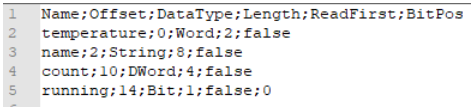
The CSV file can be exported from the TIA Portal
- Open data block in project
- Top menu: Tools → "Export to Excel..." or
- KContext menu right-click on the DB → Export → Excel/CSV
- Select a location and save as a CSV file
Typical Configuration
| PLC-Type | Rack | Slot |
|---|---|---|
| S7-300 | 0 | 2 |
| S7-400 | 0 | 3 |
| S7-1200 | 0 | 0 |
| S7-1500 | 0 | 0 |
Common Pitfalls
- Wrong rack or slot number
- Accesstype PUT/GET is not enabled for the requested DB in PLC
- optimized DBs without symbolic access
- max. connections exceeded
- Note connection restrictions depending on the PLC model (max. parallel S7 connections)
- incorrect offset specified for the data element
S7 Client Connection Configuarion
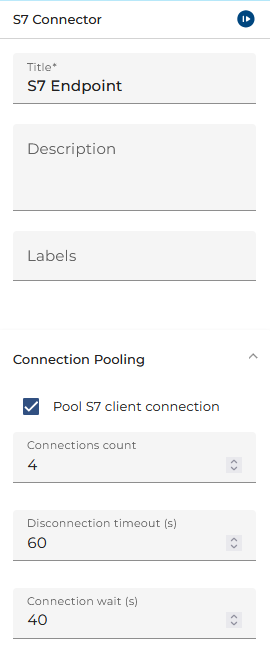
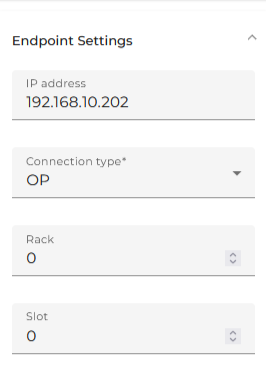
The connection to the PLC is established via the TCP/IP based S7 protocol. In addition to the parameters for the actual connection, further parameters for configuring the connection can be specified.
| Parameter | Description |
|---|---|
| Pool S7 client connection | Enables connection pooling of S7 Connections. |
| Connections Count | Only the given number of connections are established to the sane endpoint that is determined by IP address, rack and slot number. This may be required not to exhaust the limited number of TCP sockets on older S7 PLCs (e.g. 300 series) |
| Disconnection timeout (s) | Number of seconds waiting for a blocking TCP connection before it gets forcibly closed and the connection made available in the pool again. |
| Connection wait (s) | Number of seconds to wait for an available TCP connection in the pool. Any channel using the same pooled endpoint will be blocking and waiting for an available connection up to this limit. After that it will return with an error. |
| IP address | The IP adress to connect to a Siematic S7 PLC |
| Connection type | Type of S7 connection [PG, OP, S7-BASIC] |
| Rack | Rack number of the S7 PLC. This is the mounting rail of the unit. |
| Slot | Slot number of the S7 PLC module on the rack |